
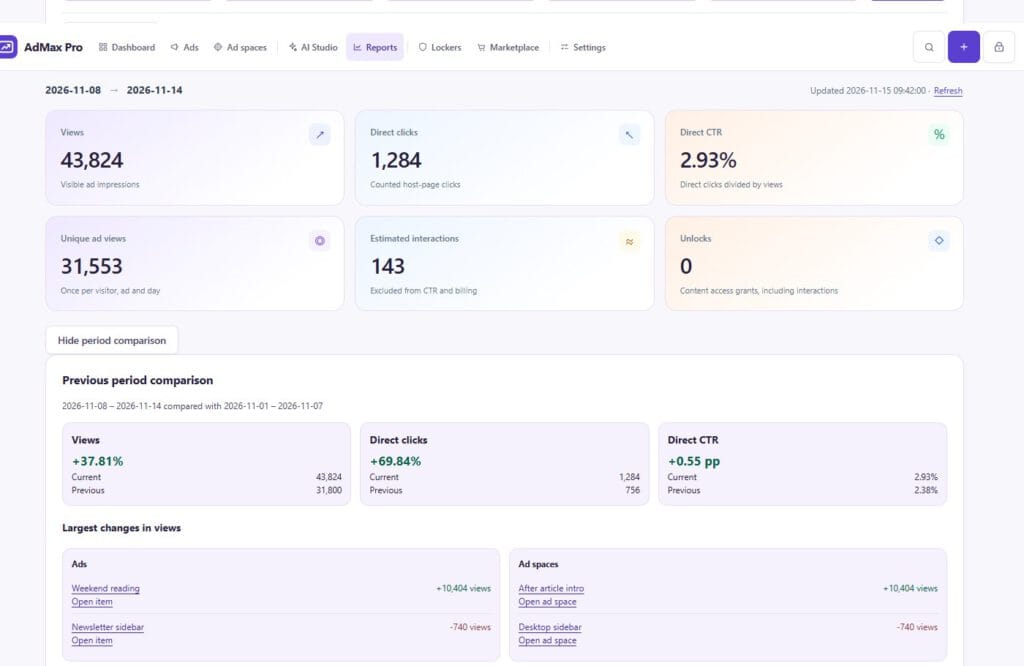
Use impressions or views to understand how often an ad was shown, counted clicks to understand tracked interactions, and click-through rate (CTR) to relate the two. In AdMax Pro, direct CTR uses counted clicks divided by views. Estimated iframe interactions have a separate counter.
Read the numbers in the same scope
Start with one date range and a known placement. Apply the same filters when comparing ads, spaces, devices or countries. A rate for mobile traffic cannot explain a change in the desktop placement unless you break the two apart. Likewise, a high rate from a small sample can change quickly as more readers arrive.
Worked example. If a placement received 2,400 views and 36 counted clicks, direct CTR is 36 ÷ 2,400 × 100 = 1.5%. If the previous comparable period had 2.0%, CTR dropped by 0.5 percentage points. These are example figures, so compare them with your actual report rather than treating them as a target.
Build a fair comparison in AdMax Pro
- Open Reports and select a complete date range. Apply the placement, ad, device or country filters that match your question.
- Turn on Compare with previous period. AdMax Pro compares with the immediately preceding interval of the same length using those filters.
- Compare the views and counted clicks before interpreting the rate. A changing audience or a change to the placement can affect both values.
- Open the placements with the largest changes in views. Keep the existing filters while you drill into one placement.
- Export the appropriate dataset as CSV and write down the report dates and filters so a later comparison uses the same scope.
The full Reports screen is available on Pro, Business, Agency and the active Business trial. The Free plan includes the dashboard overview. See the reporting and export documentation.
Separate counted clicks from estimated activity
Some ad formats render inside an iframe. AdMax Pro reports estimated iframe interactions separately from counted clicks. Use counted clicks for its direct CTR calculation. Keep the estimate in its own column when sharing the report, and label it clearly if you discuss it with an advertiser.
Check any notes about a partial current day, incomplete archive coverage or older click totals measured with a different method. If the periods are inconsistent, choose a complete range before drawing conclusions.
Decide what to change next
If views fell, inspect the placement rules before changing the creative. Confirm the ad was active, eligible on the right pages and visible on the intended devices. If views were steady while counted clicks fell, review the creative, context and destination. Try one change at a time and compare it with the next equivalent interval.
Why do WooCommerce orders and ad clicks tell different stories?
Clicks describe tracked ad interactions in the selected report. Orders describe a separate step, such as a purchase after a click or an advertiser buying a package. Track each outcome under its own definition if you want to assess the full result.
Learn how to set up your first WordPress ad placement · Explore AdMax Pro